The portfolio · 07 Assistants

Answers at 2 a.m.,
without me.

Two assistants I built answer customers on my own business sites right now. Try both, then see everything one of them knows.

Assistants · live on two businesses

Two assistants. Real customers.

Both of these are live, and customers use them. The clips are screen recordings of the real thing, made Nov 18, 2026.

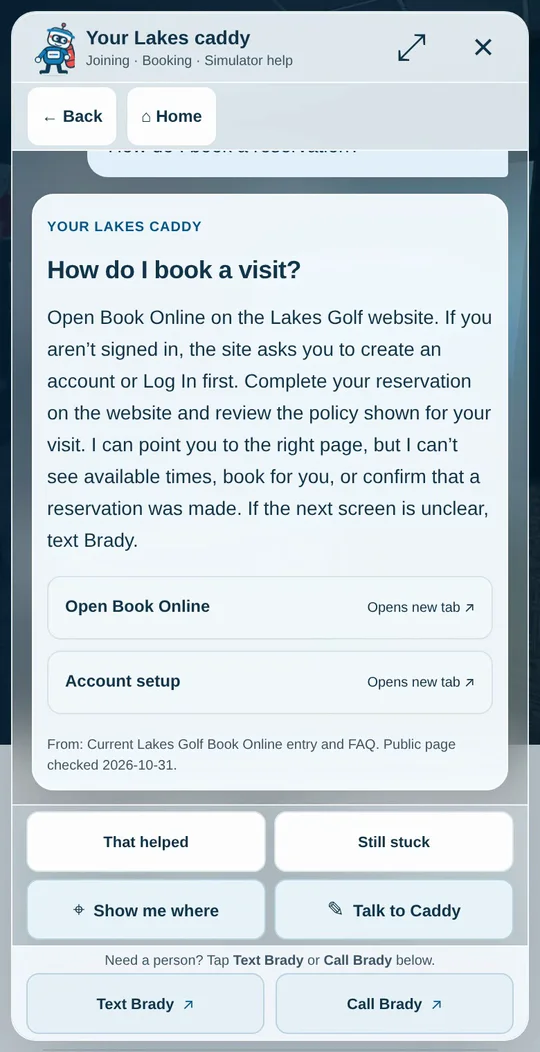
Caddy answering How do I book a visit? on a phone, with links to Book Online and account setup
Lakes Golf Simulator · live on lakesgolfsim.com

Caddy answers the 2 a.m. questions.

Lakes Golf Simulator is unstaffed and open 24/7, so Caddy is the help desk. A member taps a topic or types a question and gets the answer I approved: how to join, book a bay, start the simulator or fix a ball that won’t read.

  • 54 approved answers, each with the date it was last checked
  • A photo of the bay with the equipment marked
  • Text Brady and Call Brady on every screen
  • He can’t see accounts, book or cancel, and says so
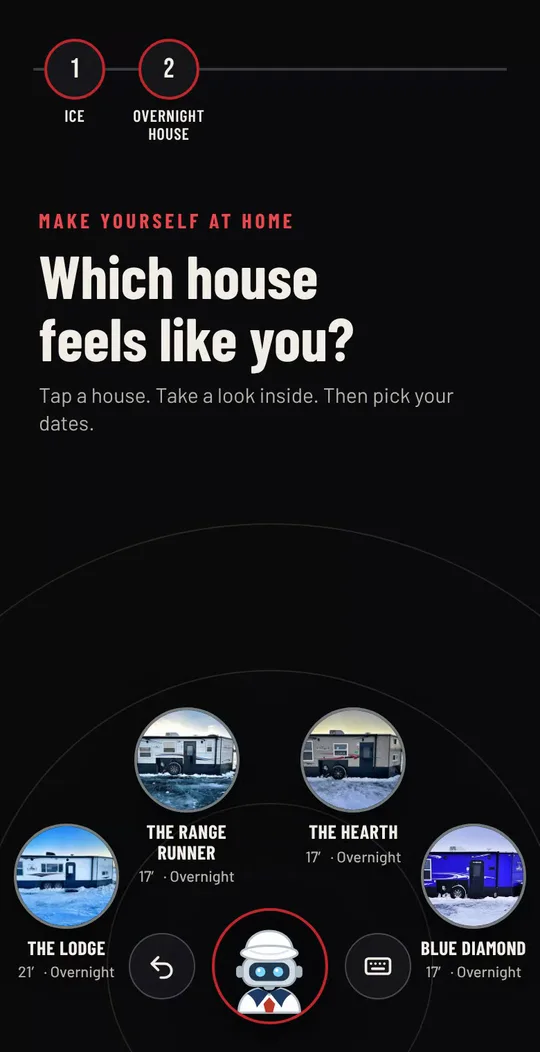
Skipper asking Which house feels like you? with four ice houses to choose from
Baxstar Fishing · live on baxstarfishing.com

Skipper gets a guest to the right trip.

Skipper turns “what do you offer?” into a booking in a few taps. A guest picks ice fishing, open water, a pontoon or a consultation, narrows it down, and Skipper opens the live booking calendar. No typing needed, though they can type a question instead.

  • Built for one thumb: big circles, no typing
  • Every pick can be changed with one tap
  • Open-water prices come from the live Baxstar price feed
  • The booking itself finishes in FareHarbor
Try Skipper (opens in a new tab)Tap the robot in the corner of the site.

Inside Caddy · the knowledge map

Everything Caddy knows, on one screen.

Caddy answers from 54 approved answers in 7 areas. Tap an area to see the questions it covers and when each answer was last checked.

Joining & booking

19 approved answers

  • How do I create an account?
  • How do I book a visit?
  • How do I cancel a reservation?
  • How do I cancel a membership?
  • Where are the new member instructions?
  • Can I reschedule a Weekday Practice reservation?
  • I have not received my access email
  • I entered the wrong email address
  • Can I add more time to my visit?
  • The website will not book across midnight
  • The booking duration or time I need is missing
  • Which bay, date and time did I book?
  • My membership payment failed
  • How much time does my membership include?
  • Does my membership automatically renew?
  • Can I book a group, school team or the whole facility?
  • Where can I get current camp or lesson information?
  • Do you sell gift cards?
  • Can I book a second member reservation today?

Getting in

4 approved answers

  • Is the simulator staffed?
  • How do I get into the facility?
  • Where is Lakes Golf Simulator?
  • Why is the simulator closed or unavailable?

Starting up

11 approved answers

  • How do I start the simulator?
  • How do I turn on the launch monitor?
  • How do I turn on the projector?
  • How do I wake the computer?
  • What simulator software is available?
  • How do I start a round in FSX 2020?
  • How do I quit FSX 2020?
  • How do I start a round in FSX Play?
  • How do I quit FSX Play?
  • How do I connect GSPro to the launch monitor?
  • How do I play in GSPro?

In the bay

10 approved answers

  • How do I use the lights?
  • How do I get club data?
  • What balls, tees, shoes, and clubs can I use?
  • How do I watch TV?
  • What are the food, drink, and cleanup rules?
  • Can I bring guests?
  • Do I have to leave when my reservation ends?
  • What are the age, guest and food rules?
  • Are rental or loaner clubs available?
  • The bay is too hot or too cold

When something breaks

4 approved answers

  • What if the golf software is frozen?
  • What if the simulator is not reading my ball?
  • The launch monitor will not turn on
  • The projector will not turn off or its remote is missing

Safety & leaving

5 approved answers

  • Should I turn the computer off when I leave?
  • Where can I hit the ball?
  • Can minors use the simulator?
  • What happens if something is damaged?
  • What do I do before I leave?

Reaching a person

1 approved answer

  • I need Brady
Ask Caddy one of these (opens in a new tab)

Snapshot of Caddy’s knowledge file, version 0.5.0, read Nov 18, 2026. The live assistant may know more by now.

How I build one

Four steps, your answers.

  1. 01

    Collect the real questions

    I start from what your customers already ask by text, phone and email. Caddy began as a bank of real member questions.

  2. 02

    Write the answers once

    Each answer is written, sourced and dated. You approve every one before a customer sees it.

  3. 03

    Give it a face and a home

    A character people remember, a launcher in the corner of your site, and a clear way to reach a person.

  4. 04

    Test it before customers do

    The assistant is run against those same real questions before launch, and again after every change.

What you get

An assistant that sounds like you.

You get a working assistant on your own website, answering in your words. It is built from your questions and your policies, and it never hides the person behind it.

Talk about yours
  • 01An assistant on your site that answers the questions your customers really ask
  • 02Answers you approved, each one dated, in one file that can be edited
  • 03A clear way to reach a person on every screen
  • 04A test run against your own customer questions before launch

Questions, answered

Before you ask about assistants.

What do these assistants actually do?

They answer customers on my business websites when I can’t. Caddy helps Lakes Golf Simulator members join, book and fix simulator problems at any hour. Skipper walks Baxstar Fishing guests from a first question to the right trip and the live booking calendar. Both point the customer to me when a person is needed.

Can I try them myself?

Yes, both are live and open to anyone. Use the Try buttons on this page. Caddy opens on a help page of his own, and Skipper sits in the corner of baxstarfishing.com. Tap around or ask a real question. Nothing books a trip or changes an account unless you finish a booking yourself.

Where do Caddy’s answers come from?

Caddy answers from text I wrote and approved. He has 54 approved answers in 7 areas, and each one carries the date it was last checked. The map on this page lists every question he covers. When a member needs more than that, his answers send them to me by text or phone.

Can an assistant take bookings or payments?

Mine guide the customer to the booking system and stop there. Skipper narrows down the trip and opens the FareHarbor calendar, where the guest picks a time, books and pays. Caddy points members to the right page and says plainly that he can’t see available times, book for them or confirm a reservation.

What happens when the assistant can’t help?

It sends the customer to a person. Caddy keeps Text Brady and Call Brady buttons at the bottom of every screen, and his answers say so when a question needs me. Skipper offers a way to text my crew from the trip summary. I would not put an assistant on a site without that.

Could you build one for my business?

Yes, if your customers ask the same questions again and again. I start with the questions you already get by text, phone and email, write the answers with you, and put the assistant on your existing website. You approve every answer before launch, and the answers can be changed afterward.

What do you need from me to build one?

Your real customer questions and your judgment on the answers. Send me the texts, emails and policies you already have. I draft the answers, you correct them, and we test the assistant against those same questions. After launch, tell me when a price, policy or opening hour changes so the answers stay true.

Do they work on a phone?

Yes, both were built for phones first. Skipper is made for one thumb, with large circles to tap and no typing needed. Caddy opens from a small launcher in the corner of the site and shows short steps, a photo of the bay with the equipment marked, and buttons to text or call me.

Your turn

Want one answering for your business?

Tell me the questions your customers keep asking. I’ll tell you whether an assistant is the right fix, and what it would take.

The public Caption Studio, running in its own window. Photos go to the tool’s own service, not to this site.